Sheet cut-list optimizer
Pack a parts list onto plywood sheets and print the rip-and-crosscut plan
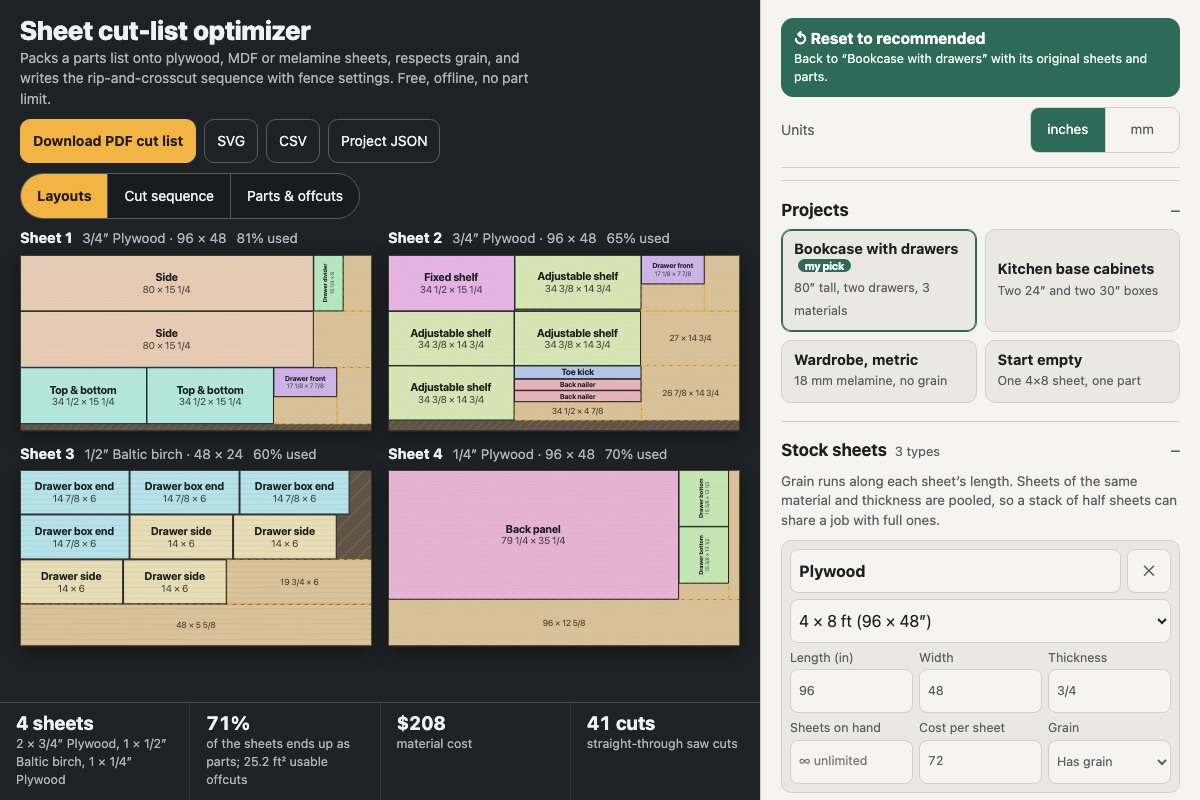
Screenshot of the tool as it opens; it is a real capture, not a mockup.
Thanks, your report was sent.
Report a problem or a newer version
What it makes
A cutting plan for sheet goods: a diagram of every sheet with each part labelled and the usable offcuts marked, how many sheets of each material to buy and what they cost, the yield, and a numbered rip-then-crosscut sequence with the fence or stop setting for every cut. The PDF has a summary page (stock to buy, the full parts list, offcuts to keep) and one page per sheet layout with its parts table and cut sequence; identical sheets share a page marked with how many to cut.
How to use it
- Pick a project (the bookcase is the recommended starting point) or start empty, and choose inches or millimetres.
- Enter each stock sheet you can buy: material, thickness, size (4×8, 1220×2440, 5×5 Baltic birch, half and quarter sheets, or custom), how many you have (blank for unlimited), a price, and whether it has grain.
- List the parts with finished length, width and quantity. Keep grain along the length for show faces; set Either for hidden parts so they can turn. Paste rows straight from a spreadsheet, or a JSON parts list.
- Set the blade kerf and any edge trim, and leave Guillotine cuts on for a table saw, panel saw or track saw (turn it off to nest tighter for a CNC router).
- Read the Layouts and Cut sequence views, then download the PDF and take it to the saw.
Build notes
- Grain runs along each sheet's length; a part with grain along its length is never turned sideways on a sheet that has grain.
- The packer tries rip-first and crosscut-first strip layouts over several sort orders and orientations, keeps the one with the lowest total sheet area (or lowest cost when every sheet has a price), breaking ties by fewest sheets, and stops within about two seconds on big lists; it is a strong heuristic, not a proven optimum.
- Fence settings are the size of the piece being cut off, measured from a clean edge; the kerf goes to the other side. Check sizes against your actual material, since plywood often runs undersize in thickness.
- The SVG is in millimetres with parts as red (#FF0000) outlines and each sheet edge in blue (#0000FF) as a reference; delete the blue outlines before sending it to a router.
- A parts list shaped like {"parts":[{"name","length","width","qty","grain"}]} (with optional "units", "material" and "thickness") loads directly, so other tools can hand over their cut lists.
- Works fully offline once opened; nothing is fetched or uploaded.
Versions
The site runs the newest. Every earlier version stays downloadable, unchanged, for builds already under way.