Music box strip maker
Turn a tune into a laser-cut or printed strip for a paper-strip music box
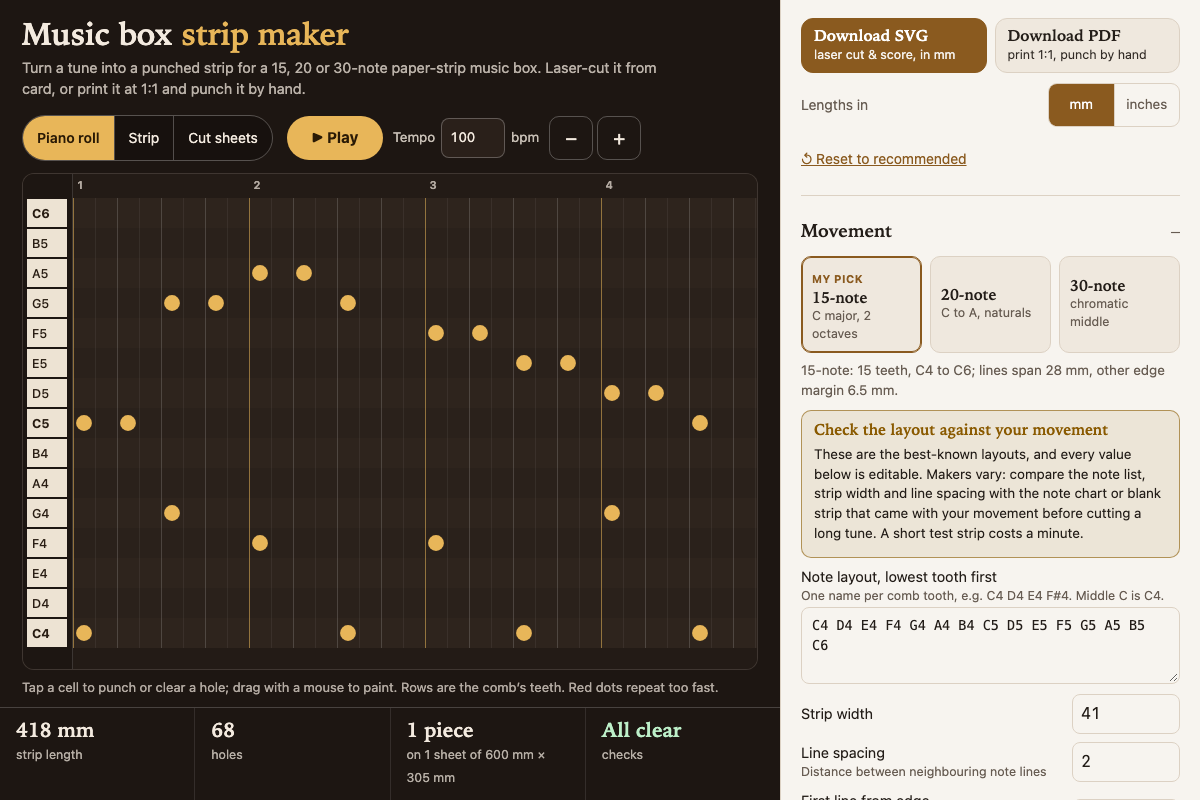
Screenshot of the tool as it opens; it is a real capture, not a mockup.
Thanks, your report was sent.
Report a problem or a newer version
What it makes
A punched music strip for a hand-crank paper-strip music box movement. The SVG is drawn in millimetres with red cut circles for every hole at the movement's hole diameter, a red cut outline with a tapered lead-in, blue score lines for the note lines and beats, and piece numbers and a feed arrow engraved as vector strokes. Long tunes are split into pieces that fit the chosen bed (600 × 305 mm xTool P2 by default), each with a join tab that glues under the next piece. The PDF is the same strip at 1:1, tiled across Letter or A4 pages with hatched overlaps and a 50 mm check square, for printing on card and punching by hand.
How to use it
- Pick the 15, 20 or 30-note movement and compare its note list, strip width and line spacing with the chart that came with it; edit any value that differs.
- Load a demo tune, tap holes into the piano roll, paste text notation such as C5/4 D5/8, or import a MIDI file and read the import report.
- Press Play to hear it and watch the strip scroll past the comb.
- Work through the Checks: fix repeats closer than the minimum re-strike spacing, holes near the edge and notes off the comb.
- Download the SVG for the laser (red cut, blue score, black engrave), or the PDF to print at 100% and punch by hand.
- Join pieces by gluing each tab under the next piece, then feed the arrow end into the movement first.
Build notes
- Movement layouts vary between makers; the presets are the best-known ones, so cut a short test strip before a long tune.
- Beats are quarter notes; each beat uses the movement's travel per beat of strip, and hole positions only mark when each note starts.
- The minimum repeat spacing (7.5 mm by default) is a rule of thumb; raise it if repeated notes buzz or skip on your movement.
- Card between about 160 and 250 gsm works for most movements; thicker card may not feed.
- Works fully offline once opened; nothing is fetched.