Song sketcher — perreo, cumbia, folk, bossa, darkwave
Original songs in five genres, from perreo to bossa nova, as WAV and MIDI
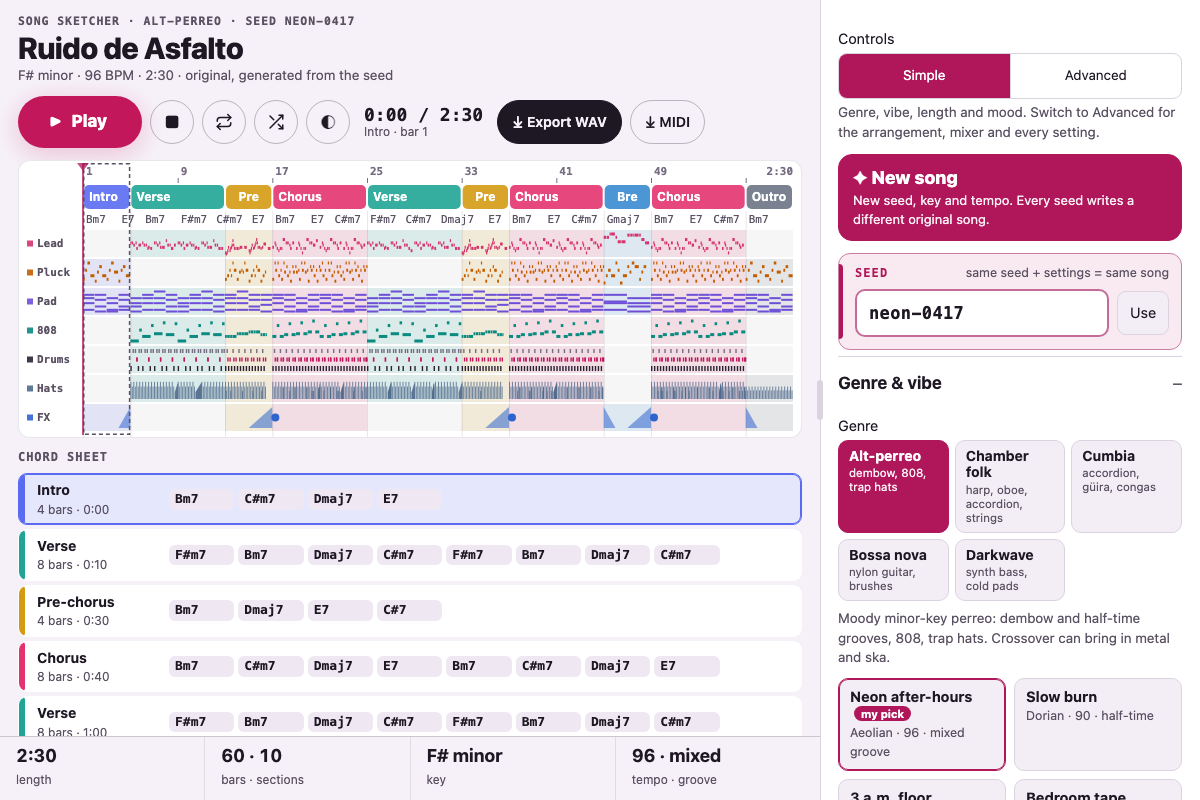
Screenshot of the tool as it opens; it is a real capture, not a mockup.
Thanks, your report was sent.
Report a problem or a newer version
What it makes
An original song, 2 to 10 minutes long, generated from a seed, in one of five genres. Alt-perreo: intro, verses, pre-choruses, choruses, bridge or breakdown and outro, with minor-key progressions, a dembow or half-time groove with trap hi-hat rolls, a gliding 808 sub, reverb-washed pads, a detuned pluck with a dotted-eighth delay, risers and impacts, optional lo-fi texture, and an optional crossover: distorted drop-D chugs, double kick and breakdowns (metal), off-beat skanks and horns (ska), or both. Chamber folk: long verses, a refrain that comes round, an interlude and a coda, in major, mixolydian, dorian or aeolian, as a 3/4 waltz or in 4/4, with a Karplus–Strong harp playing ostinato figures and glissandi, an oboe counter-line (or melody when no one sings), accordion, a string section and a walking upright bass. Cumbia: an accordion that plays melodies in thirds between verses and off-beat stabs under the voice, güira scraping every beat, llamador and conga, and a bass on one and three. Bossa nova: syncopated nylon-guitar chords over a thumbed bass, shaker sixteenths, a two-bar cross-stick figure, soft strings and an oboe line. Darkwave: driving eighth-note synth bass, a straight backbeat with snare fills, cold pads and a chorused pluck. Any genre can borrow any other's instruments. Every song has a motif-based lead melody in a singable range to use as a vocal guide. Export a 44.1 kHz 16-bit stereo WAV, a format 1 MIDI file with one track per instrument plus tempo, meter, key and section markers, or the settings as JSON.
How to use it
- Pick a genre and a vibe preset, then press New song until one grabs you, or type any word into Seed. The same seed and settings always make the same song.
- Choose Simple or Advanced at the top of the panel. Simple shows the genre, vibe, length and mood (plus a chord sheet to sing over on a wide screen); Advanced adds the arrangement, crossover, song settings, mixer and theme. On a wide screen, drag the divider beside the panel (or the one between the section list and the inspector) to give either side more room; double-click it to reset.
- Under Mood, pick a place to land: Rainy day (slow, soft, hazy, minor), Sunny afternoon (bright, bouncy, dry, major where the genre has it), Late night (unhurried and low, the lead close), Dreamy (the beat far back, the biggest room) or Party (fast, full, punchy). Each sets the tempo within the genre's usual range, energy, groove, lo-fi, reverb and the mixer; More upbeat and Less upbeat nudge them a step at a time. The seed and key stay, and every control a mood moves can be fine-tuned in Advanced.
- Set the essentials (key, mode, tempo, and groove or meter), then energy.
- Add or remove instruments under Mixer, from either genre. Each section plays them on Auto; tap a part in a section's inspector to switch it on or off there.
- Click a section in the timeline or the arrangement list to edit its type, bars and chords. Drag a section by its grip to reorder it (Alt + arrow keys from the keyboard); duplicate, remove or add sections, and use New melody to rewrite a section type's melody.
- In alt-perreo, Crossover brings in Metal, Ska or Ska-metal; Collide rolls a random one.
- Press Play (or the space bar); Pause keeps your place and Stop goes back to the start. Click a section's name in the timeline to jump to its start, or anywhere else to jump to that moment. Loop section repeats the selected section while you write. The repeat button loops the whole song; the keep-playing button starts a new song (a new seed) each time one ends, and under Playback you choose whether it stays in this genre or can be any of the five.
- On a phone or tablet, keep it playing with the screen off: once the clock says Screen-off ready, lock the phone or switch apps and the song carries on, with play, pause, seek and next on the lock screen. An edit plays straight away and the song is rendered again a moment later; with keep playing on, the next song is rendered while this one plays.
- Balance the mixer, pick a theme, then export a WAV to sing over or the MIDI to open in a DAW.
Build notes
- All sound is synthesized with the Web Audio API: oscillators, noise, filters, Karplus–Strong plucked strings for the harp, nylon guitar and upright bass, congas and güira shaped from sines and noise, a convolution reverb with a generated impulse, and a compressor. There are no samples, and nothing is fetched or sent.
- Progressions come from pools of common moves in each mode and the melodies are generated from short motifs, so each seed gives a new original song rather than a copy of an existing one.
- The default song renders to WAV in a few seconds; a 10-minute song takes proportionally longer.
- Phones stop live Web Audio when the screen goes off, so on a phone or tablet a playing song is also rendered, as the WAV export does but at 32 kHz, and played through the browser's audio player with Media Session controls. It is ready as soon as the render is (a few seconds for a default song on a laptop, longer on a phone); an iPhone locked before then stops until it is unlocked. A slow phone, judged by how long the drum sounds take to render when the page opens, gets a shorter live reverb and a render that leaves the live engine room. Desktop browsers keep playing live.
- Drums, hats, 808, pluck, FX and the crossover parts are written for 4/4 and sit out in 3/4.
- MIDI tracks use General MIDI programs as placeholders; drums and hats are on channel 10.
Versions
The site runs the newest. Every earlier version stays downloadable, unchanged, for builds already under way.