Speaker cabinet designer
Turn a woofer's Thiele/Small specs into a tuned box, port and cut-ready panels
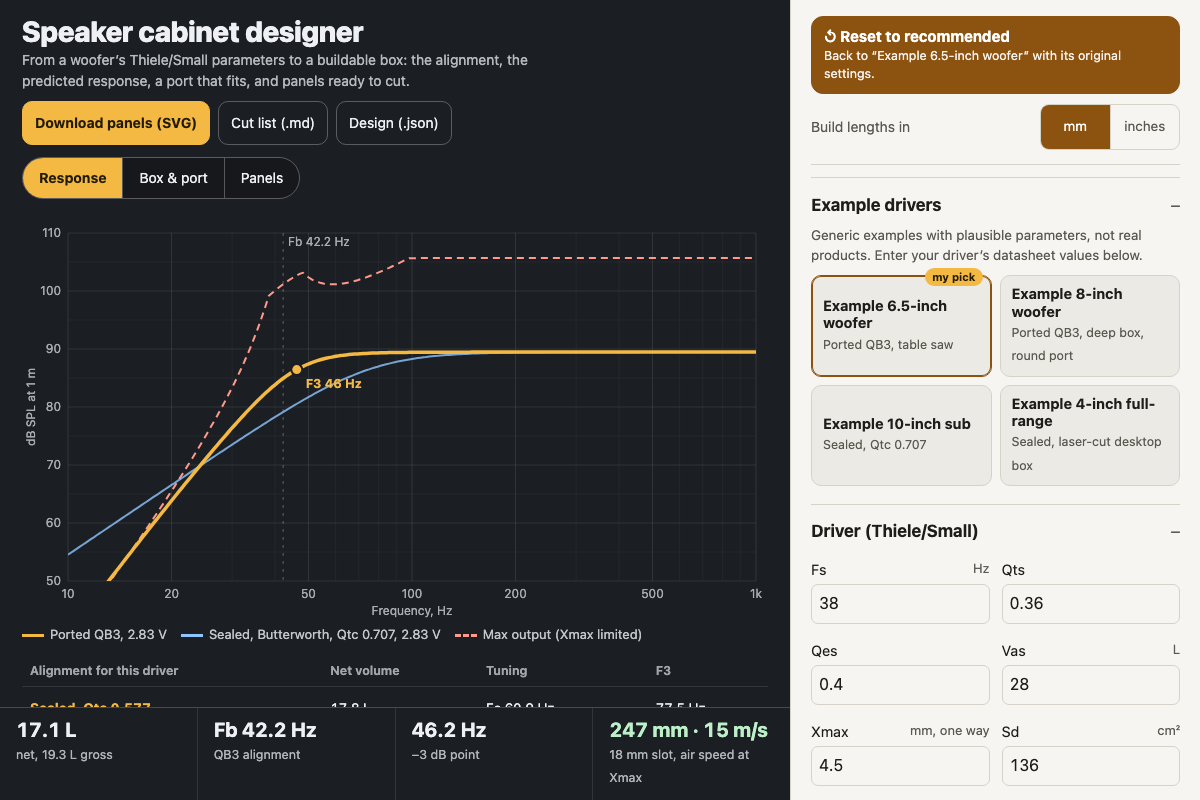
Screenshot of the tool as it opens; it is a real capture, not a mockup.
Thanks, your report was sent.
Report a problem or a newer version
What it makes
A complete cabinet design from a driver's datasheet: the box volume and tuning for the chosen alignment, a predicted response curve with the maximum output before Xmax, a round or slot port with its length and peak air speed, and the box's inside and outside dimensions. The panel SVG is in millimetres with red cut lines, the driver and port holes, and engraved part numbers, packed onto your sheet. A Markdown cut list and a JSON design file go with it.
How to use it
- Start from an example driver or type in your woofer's Fs, Qts, Qes, Vas, Xmax, Sd, Re and Pe, plus the cutout, frame diameter and mounting depth.
- Choose sealed or ported and an alignment, or tap a row in the comparison table under the chart. Manual lets you set the volume and tuning yourself.
- For a ported box, choose a round tube or a slot and watch the air speed; "Size port for 17 m/s" enlarges the port until it stays quiet.
- Set the proportions (golden ratio or a fixed width and height), bracing volume and material thickness, then pick the table-saw or laser build.
- Download the panels SVG, the cut list and the design file. Cut, glue, seal the seams and line the walls.
Build notes
- Sealed maths follows Small's closed-box analysis; ported alignments follow Thiele's B4 and QB3 as analysed by Small, with box losses QL = 7. Keele's curve fit is shown for comparison. SBB4 is not offered.
- Port length uses the Helmholtz formula with a flanged-plus-free end correction. Slot ports use the equivalent round radius and may tune slightly low.
- Finger joints are for 3–6 mm sheet, with kerf compensation. The table-saw build states its butt-joint convention: front and back overlap everything.
- The example drivers are generic, not real products. Works fully offline.